
The thank-you video maker for nonprofits: collect short video messages from your team, the people you serve and your board with one link, then send donors and volunteers one reel. Every video plays back in order. No app for contributors, no editing for you.
Donors and volunteers hear from you in a form letter and an annual report. A short video from the people their gift helped is the thank-you they remember, and it takes your team minutes, not a production budget.
One link. People record on their phone or laptop in about a minute. No app to download. They sign in once to record.
A letter says thanks for your support. A clip from a student, a nurse or a family says what that support actually did.
Send it after GivingTuesday, play it at the gala, or share it with the whole volunteer list. People rewatch it. Letters go in a drawer.
Setting up the reel takes about two minutes. After that you are just sharing a link and waiting for people to record.
Name who it's for, like “Our 2026 donors” or one volunteer, and set the questions, something like: what did this year make possible for you?
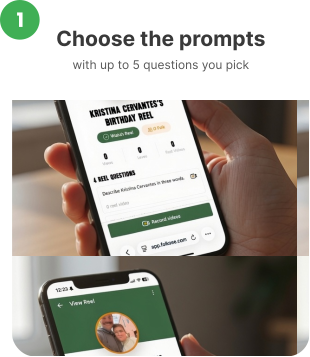
Email it to staff, post it in Slack, or send it to the families you serve. Contributors record right in their browser, or upload a video they've already filmed.

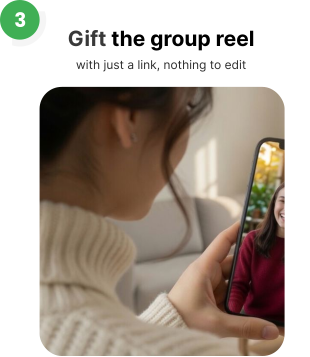
Every video plays back in order in one reel. Send the private link to donors, or play it at your event with Watch on a big screen.
Need thank-you video questions? Try our free question generator →
One reel can thank a single donor or everyone who gave this year. Pick the questions and contributors know exactly what to say.
A thank-you in the week after GivingTuesday, from the people their gift reached.
A personal reel for one donor, with voices from the program, the board and the people they helped.
Voices from every shift and every program, not just the coordinator who wrote the nomination.
A send-off for a retiring board member, or a year-end thank-you to the whole board.
Thank the people who show up for free, in a way that costs you almost nothing.
Show a sponsor or a foundation what their grant made possible, in the words of the people it helped.
Collect messages before the gala and play them on the night, or thank everyone who came.
Nonprofit teams carry a lot. One reel from the whole organization, for one person or a whole team, at year-end.
Families, students and clients often want to thank donors and never find the moment. One link gives them a way, in their own words and from their own phones.

What did this program make possible for you this year?
Say thank you to the people who made it happen.
What would you tell someone thinking about giving?
The organizer controls who receives the contributor link, and the finished reel is only seen by the people it's shared with. Ask families before sharing a reel outside your organization.
One credit covers one person who records, however many videos they add. After your free credits, packs cost less per person as they get bigger, from 10 for $10 to 100 for $75. No subscription and no seats.
With the limited-time nonprofit offer
A small team or one program
A program and its families
A floor, a school, a chapter
A whole organization
For a limited time, nonprofits, schools, hospital foundations and clinics get 50 free credits. Email support@folksee.com from your organization's email address and we'll add them to your account. There's no application form and no sales call.
Contributors tap the link, sign in once, allow the camera and record. Nothing to install.
Any modern phone, tablet or laptop browser. No app store approval needed on managed devices.
There's nothing to trim or stitch. Every video plays back in order, question by question, and you share one link.
Only people with the contributor link can record, and only people you send the finished reel to can watch it.
Create a reel, pick up to 5 questions (for example, what did this year make possible?), and share one link with your staff, volunteers and the people you serve. Everyone records a short video from their phone, and every video plays back in order in one reel you send to donors.
No app. They open the link, sign in once, allow camera access and record in their browser. Each answer is up to 45 seconds, so most people are done in a few minutes.
As many as you like. One credit covers one person who records, and if you run out, nobody's turned away: their videos wait until you add credits.
Yes. For a limited time, nonprofits get 50 free credits. Email support@folksee.com from your organization's email address and we'll add them to your account. There's no application form and no sales call.
Within a week or two of the gift is ideal. Many teams make one reel right after GivingTuesday or at year-end, and play it again at their spring event.
Only the people you share it with. The reel is private and isn't listed or searchable anywhere, so ask families before you share it more widely.
Start a reel free, share one link, and let the people they helped do the talking.
First 5 credits free, no credit card. Nonprofits: 50 free credits for a limited time. Email support@folksee.com.
Why a reel and not a letter
A thank-you letter tells donors their gift arrived. A reel shows them who it reached, in their own voices.
Read what Reels with Feels means →


Everything works best in your phone’s browser. Tap below to open Folksee in Chrome/ Safari.


